
LayrShift
Forge WordPress with your AI agent. Connect Cursor, Claude Code, and VS Code to dev and staging sites.
Dev & staging only — not for production sites.
About LayrShift
LayrShift is an MCP server plugin for WordPress that lets AI agents read and write your site, run sandboxed PHP, manage Gutenberg batches, and load 25+ skill playbooks — all through an authenticated HTTP API built on the WordPress Abilities API.
What you get with LayrShift
MCP HTTP endpoint
Expose WordPress abilities at /wp-json/layrshift/v1/mcp for Cursor, Claude Code, and VS Code.
Filesystem tools
Read, write, edit, and delete files under your site root with path validation.
Sandboxed PHP
Run experimental code in wp-content/layrshift-sandbox/ with autoload support.
Gutenberg queue
11 abilities to queue block changes and finalize them in the browser.
Template Studio
AI page generation with Gemini — build layouts from prompts on dev sites.
Abilities Hub
Per-tool toggles, activity log, and MCP connection wizard in WordPress admin.
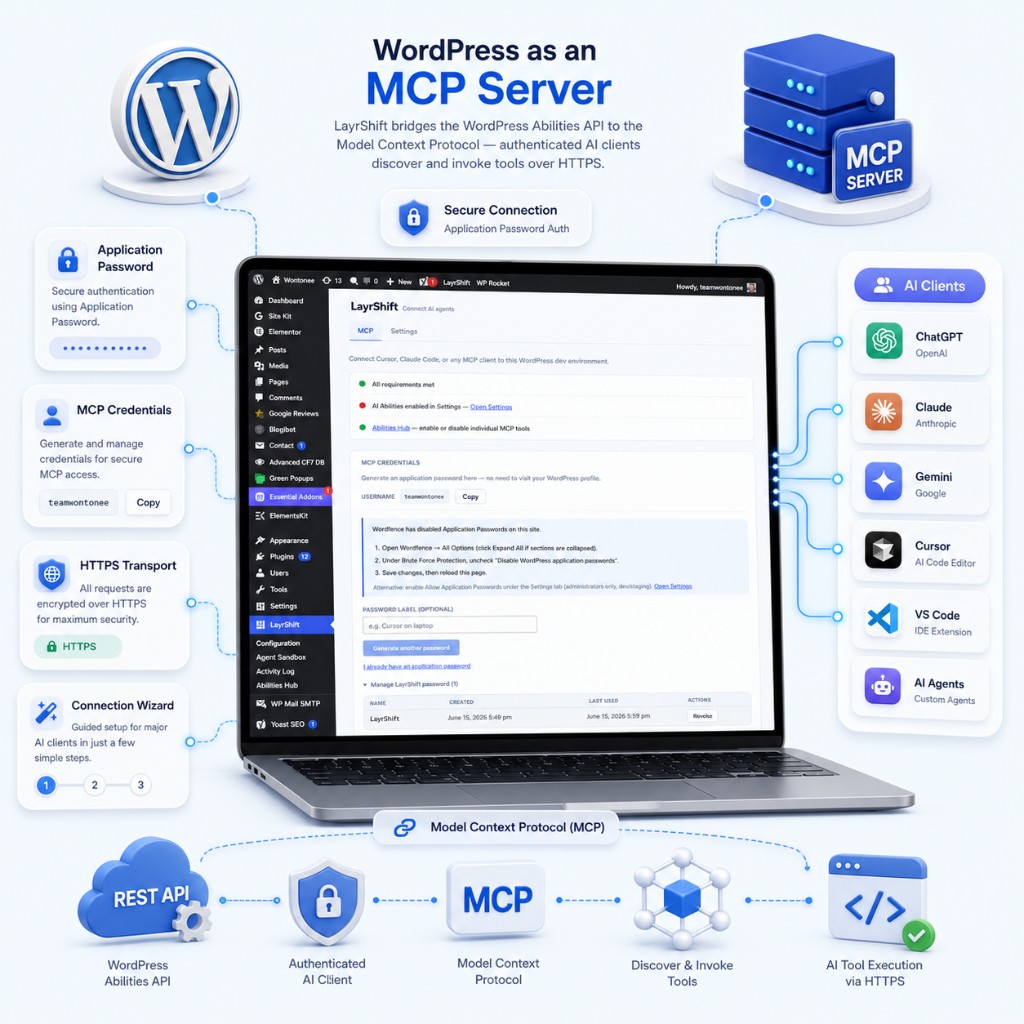
WordPress as an MCP server
LayrShift bridges the WordPress Abilities API to the Model Context Protocol — authenticated AI clients discover and invoke tools over HTTPS.
- HTTP transport with Application Password auth
- Built on WordPress MCP Adapter
- MCP connection wizard for major clients

Patch themes and plugins with your agent
Inspect and modify theme, plugin, and mu-plugin files. Optional execute-php and WP-CLI abilities for full dev builds.
- Read / write / edit / delete under site root
- Signed upload URLs for zips and media
- Sandbox directory for safe experiments
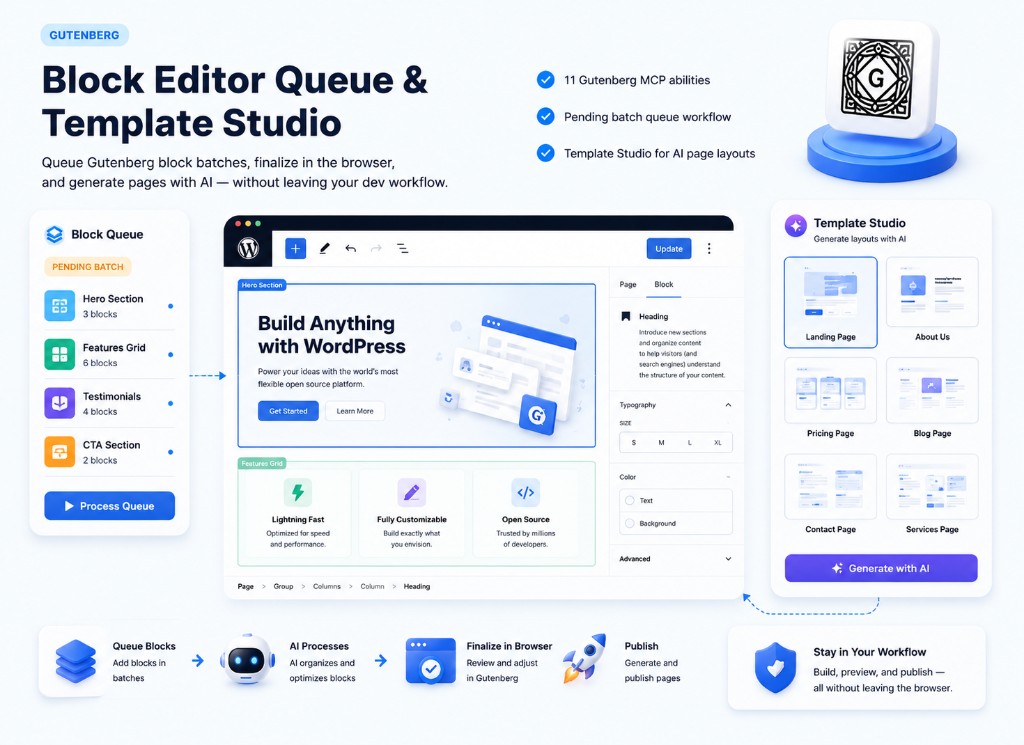
Block Editor Queue & Template Studio
Queue Gutenberg block batches, finalize in the browser, and generate pages with AI — without leaving your dev workflow.
- 11 Gutenberg MCP abilities
- Pending batch queue workflow
- Template Studio for AI page layouts
Works with your stack
MCP clients and WordPress plugins LayrShift integrates with out of the box.
LayrShift vs Novamira
Both are MCP server plugins for dev/staging WordPress. Here is how they compare at a glance.
| Feature | LayrShift | Novamira |
|---|---|---|
| Distribution | Free — download zip | License at novamira.ai |
| WordPress.org directory | No | No |
| License | GPL-2.0-or-later | AGPL-3.0 (core) |
| Target environment | Dev / staging only | Dev / staging only |
| MCP transport | HTTP + Application Password | HTTP + Application Password |
| Core filesystem + sandbox | Yes | Yes |
| Execute PHP | Yes (full / dev builds) | Yes |
| WP-CLI abilities | Yes (full / dev builds) | Yes |
| Gutenberg Block Editor Queue | Yes (11 tools) | Yes (11 tools) |
| Plugin-specific MCP abilities | 15 (5 integrations × 3) | Via Novamira Pro |
| Built-in agent skill playbooks | 25 | 2 in OSS core |
| MCP skill prompts | ~25 | One per registered skill |
| Project memory | No | Yes |
| Novamira Visual workspace | No | Yes |
| Abilities Hub | Yes | Yes |
| Activity log | Yes | Yes |
How it works
Four steps from install to your first MCP tool call.
Install the plugin
Download the release zip and upload via Plugins → Add New → Upload.
Enable abilities
Acknowledge the dev/staging warning and opt in to AI abilities in Settings.
Connect MCP client
Create an Application Password and paste the config into Cursor or Claude Code.
Use Abilities Hub
Enable individual tools per workflow and monitor activity from admin.
MCP abilities checklist
Registered MCP tools when relevant plugins are active and abilities are enabled.
| Ability | LayrShift | Novamira core | Novamira Pro |
|---|---|---|---|
| Filesystem — read / write / edit / delete | |||
| List directory | |||
| Create upload link | |||
| Sandbox enable / disable file | |||
| Execute PHP | |||
| Run WP-CLI (+ async job poll) | |||
| Create admin access link | |||
| Gutenberg — get / write content | |||
| Gutenberg pending batch queue (11 tools) | |||
| Elementor — get / save / list templates | |||
| Yoast SEO — get / update post SEO | |||
| Smush — stats, bulk smush | |||
| VaultShift — status, scan, activity | |||
| BlogiBot — status, list posts, settings | |||
| Skills API — skill get / write / edit | |||
| Discovery — discover-abilities |
Choose LayrShift if you want
- A free, GPL MCP stack on GitHub with no license server
- More abilities included immediately (integrations + 25 skills)
- First-class MCP tools for VaultShift and BlogiBot
Choose Novamira if you want
- Novamira Pro native abilities and commercial support
- Project memory across agent sessions
- Novamira Visual browser workspace
Trusted by WordPress developers
We wired Cursor to our staging site in ten minutes. Theme edits that took hours now happen in one agent session.
The Gutenberg queue is brilliant — agents draft block changes, we review and finalize in the editor.
25 built-in skills meant our team didn't have to write MCP playbooks from scratch. Huge time saver.
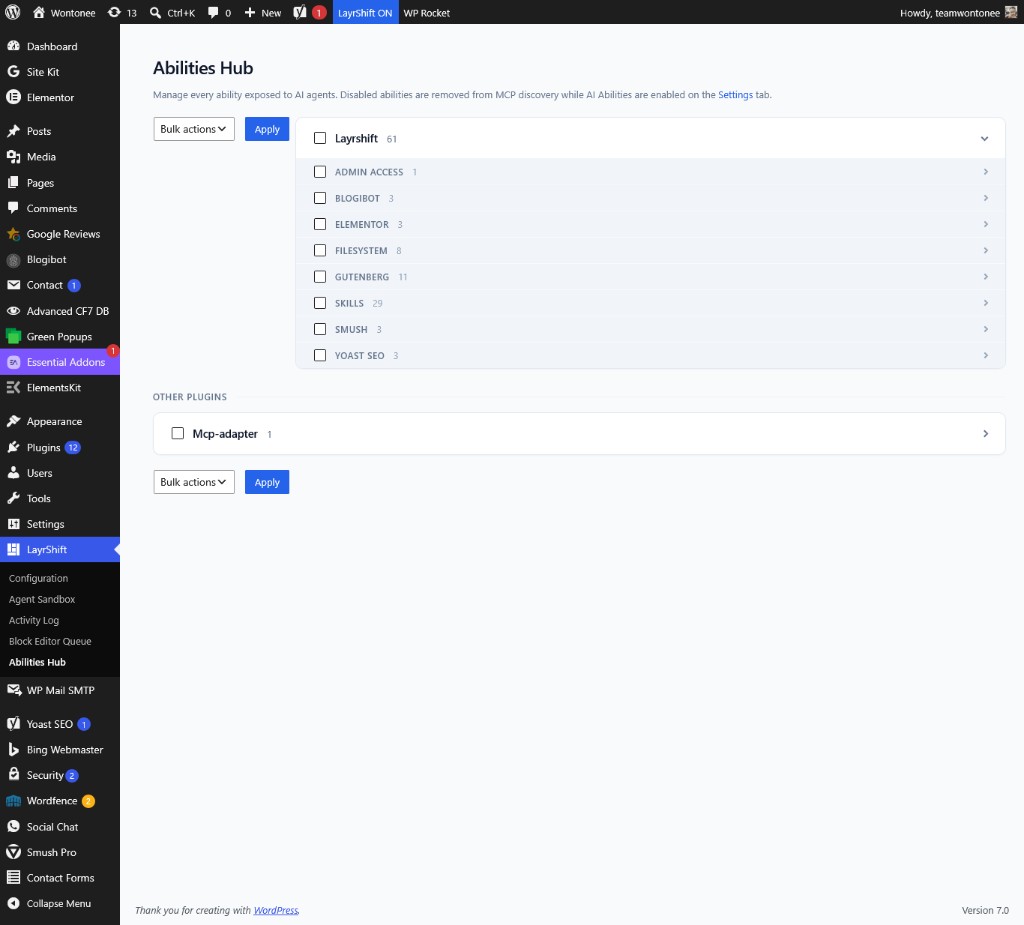
Admin built for agent workflows
MCP connection wizard, per-tool toggles, activity log, and Agent Sandbox manager — everything an administrator needs to run AI on a dev site safely.
- MCP connection wizard
- Abilities Hub
- Activity log
MCP connection wizard
Copy-paste configs generated for your client and site URL.
Abilities Hub
Toggle individual tools on or off per workflow.
Activity log
Audit what agents did on your dev site.
See LayrShift in action
Watch how to install the plugin, enable abilities, and connect your MCP client to WordPress.