
In this tutorial we will learn about how to create a contact form in vue and using laravel REST API as a back end and for mailing i am using amazon SES. If you are new to VUE and laravel then go through our previous topic basics of laravel and vue js.
Lets start our steps :
Lets start with basics of Laravel as a back end and front end as VUE : –
1.Install the composer in your system if it’s not exist.
2. Open the command prompt and type composer create-project laravel/laravel myblog
3. Go your folder by changing directory from the command prompt cd foldername
4. Install the UI package composer require laravel/ui
5. Type the scaffolding php artisan ui vue
6. Now install node_module npm install be sure that node js is install in your system.
7. Now install npm install vue-loader
8. Now run npm run watch , while working in the front end this will help you to see the modification running in your browser. But be sure once your work is done then run npm run production for deployment.
9. Now open and rename file ExampleComponent with Contact resources/js/components/Contact.vue and copy this code
					<template>
   <div class="container">
    <p style="color:red" v-if="success">Message Send !</p>
         <form @submit="submitform">
                <h1>Wontonee Contact Form</h1>
                 <div class="form-group">
                  <label for="exampleInputName">Name</label>
                  <input type="text" class="form-control" id="exampleInputName"
                  placeholder="Name" required name="fullname"  v-model="fullname" >
                </div>
                <div class="form-group">
                  <label for="exampleInputEmail1">Email address</label>
                  <input type="email" class="form-control" id="exampleInputEmail1" aria-describedby="emailHelp"
                  placeholder="Enter email" required v-model="emailaddress">
                </div>
                 <div class="form-group">
                  <label for="exampleInputEmail1">Comment</label>
                  <textarea name="comment" id="comment" class="form-control" required v-model="message"></textarea>
 </div>
 <button type="submit" class="btn btn-primary">Submit</button>
 </form>
 </div>
</template>

<script>
    export default {
        mounted() {
            console.log('Component mounted.')
        }
    }
</script>
10. Change the config details in resources/js/app.js
Vue.component('contact-component', require('./components/Contact.vue').default);
11. Create an email template blade `mailtemplate.blade.php`
					<!DOCTYPE html>
<html lang="en">
<head>
    <meta charset="UTF-8">
    <meta name="viewport" content="width=device-width, initial-scale=1.0">
    <meta http-equiv="X-UA-Compatible" content="ie=edge">
</head>
<body>
    <table width="100%">
        <tr>
            <td>Name : {{ $fullname }}</td>
            <td>Email address : {{ $emailaddress }}</td>
            <td>Message : {{ $msg }}</td>
        </tr>
    </table>
</body>
</html>
12. Create a controller name php artisan make:controller ContactController
13. Create a function for mail
					<?php

namespace App\Http\Controllers;

use Illuminate\Http\Request;
use Illuminate\Support\Facades\Mail;

class ContactController extends Controller
{
    //
    public function Sendmail(Request $request)
    {

        $contactform = $request->json()->all();

        $data = array(
            'fullname' => $contactform['fullname'],
            'emailaddress' => $contactform['emailaddress'],
            'msg' => $contactform['message']
        );

        Mail::send('mailtemplate', $data, function ($message) use ($data) {
            $message->from('saju.g@wontonetech.com', 'Contact Form');
            $message->sender('saju.g@wontonetech.com', 'Contact Form');
            $message->to('saju@wontonee.com', "Contact Form");
            $message->subject('Contact form');
          });


    }
}
14. Create a route for this routes/api.php
					use App\Http\Controllers\{
    ContactController
};

Route::post('contact',[ContactController::class,'Sendmail']);
15. Now open contact.js component and link the form with the api by using the axios
					<template>
   <div class="container">
    <p style="color:red" v-if="success">Message Send !</p>
         <form @submit="submitform">
                <h1>Wontonee Contact Form</h1>
                 <div class="form-group">
                  <label for="exampleInputName">Name</label>
                  <input type="text" class="form-control" id="exampleInputName"
                  placeholder="Name" required name="fullname"  v-model="fullname" >
                </div>
                <div class="form-group">
                  <label for="exampleInputEmail1">Email address</label>
                  <input type="email" class="form-control" id="exampleInputEmail1" aria-describedby="emailHelp"
                  placeholder="Enter email" required v-model="emailaddress">
                </div>
                 <div class="form-group">
                  <label for="exampleInputEmail1">Comment</label>
                  <textarea name="comment" id="comment" class="form-control" required v-model="message"></textarea>
 </div>
 <button type="submit" class="btn btn-primary">Submit</button>
 </form>
 </div>
</template>
<script>
    export default {
      data()
      {
        return {
         fullname:'',
         emailaddress:'',
         message:'',
         success: false,
          }
      },
     methods:{
       submitform: function (e) {
         e.preventDefault();

         let self = this;

         const params = JSON.stringify({
           fullname : this.fullname,
           emailaddress: this.emailaddress,
           message: this.message
         });
         axios.post('api/contact',params,
        {
            headers: {
                "content-type": "application/json",
             },

        })
        .then(function (response) {

          self.success = true;

        })
        .catch(function (error) {
           // handle error
           console.log(error);
        })
        .then(function () {
           // always executed
        });

        }
      },
    }
</script>
16. Open resources/view/welcome.blade.php link your vue component here.
					<!DOCTYPE html>
<html lang="{{ str_replace('_', '-', app()->getLocale()) }}">
    <head>
        <meta charset="utf-8">
        <meta name="viewport" content="width=device-width, initial-scale=1">
        <title>Wontonee Contact Form</title>
        <link rel="stylesheet" href="https://maxcdn.bootstrapcdn.com/bootstrap/4.0.0/css/bootstrap.min.css" integrity="sha384-Gn5384xqQ1aoWXA+058RXPxPg6fy4IWvTNh0E263XmFcJlSAwiGgFAW/dAiS6JXm" crossorigin="anonymous">
    </head>

    <body>
        <div id="app">
            <contact-component></contact-component>
         </div>
    <script src="https://code.jquery.com/jquery-3.2.1.slim.min.js" integrity="sha384-KJ3o2DKtIkvYIK3UENzmM7KCkRr/rE9/Qpg6aAZGJwFDMVNA/GpGFF93hXpG5KkN" crossorigin="anonymous"></script>
 <script src="https://cdnjs.cloudflare.com/ajax/libs/popper.js/1.12.9/umd/popper.min.js" integrity="sha384-ApNbgh9B+Y1QKtv3Rn7W3mgPxhU9K/ScQsAP7hUibX39j7fakFPskvXusvfa0b4Q" crossorigin="anonymous"></script>
 <script src="https://maxcdn.bootstrapcdn.com/bootstrap/4.0.0/js/bootstrap.min.js" integrity="sha384-JZR6Spejh4U02d8jOt6vLEHfe/JQGiRRSQQxSfFWpi1MquVdAyjUar5+76PVCmYl" crossorigin="anonymous"></script>
 <script src="{{ asset('js/app.js') }}"></script>
 </body>
</html>
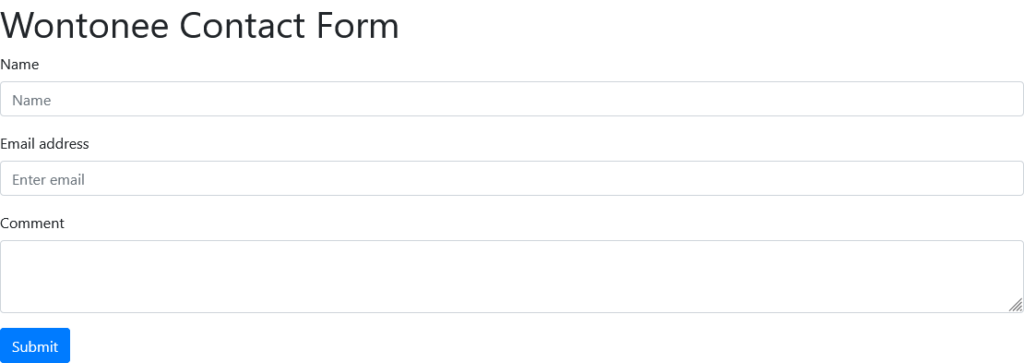
17. Run your contact form in browser you will see this
Related articles
AI Spending Is Set to Reach $2.7 Trillion in 2026: What It Means for Businesses
Global AI spending is forecast to reach $2.7 trillion in 2026, highlighting how quickly artificial intelligence is moving from experimentation into business infrastructure and everyday software.
Open-Weight AI vs Closed AI: Why Tech Giants Are Fighting Over the Future of Artificial Intelligence
The artificial intelligence race is no longer just about building the most powerful models. It has now expanded into a debate over who should have access to those models.
Anthropic Launches Claude Sonnet 5: Faster Coding, Smarter AI Agents, and a New Era for Enterprise AI
Anthropic has officially introduced Claude Sonnet 5, bringing major improvements in coding, AI agents, reasoning, and enterprise productivity. Here's everything you need to know.